ASHWIN KRISHNADAS
VNty Engine
Unity | C# | Editor Scripting | Auto code generation | Node editor | Reflection | Serialization
What is VNty Engine?
It is a tool built on Unity to develop Visual Novel / Adventure games. With this tool, you can easily create either simple story-oriented Visual novels having just images and texts or complex Adventure games with branching story lines, navigatable maps, inventory systems and character stats, with absolutely no coding! Yes! you read right! All the code will be autogenerated behind the scenes.
The tool will also come with some pretty awesome stock UI features, which can be customized easily. Anyone wanting to add custom code can do so easily since all the generated code are in partial classes.
Features
Here are some cool features of the tool!
Character Wizard
Character Wizard is used to create characters. All you have to do is open up the wizard, type in name of the character, choose a color, add in some stats (fields) if required, and press save. The tool automatically generates the code for you.
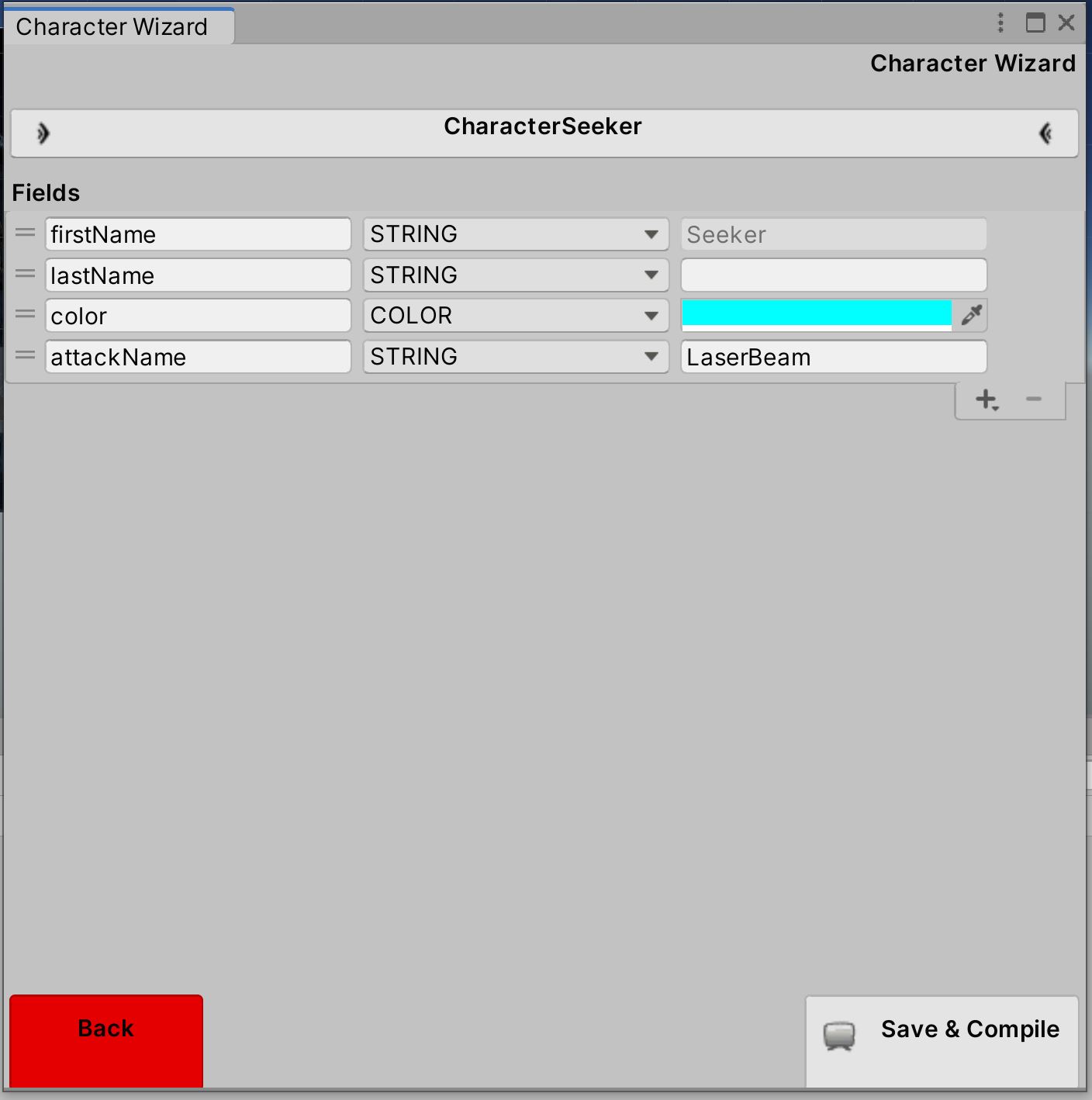
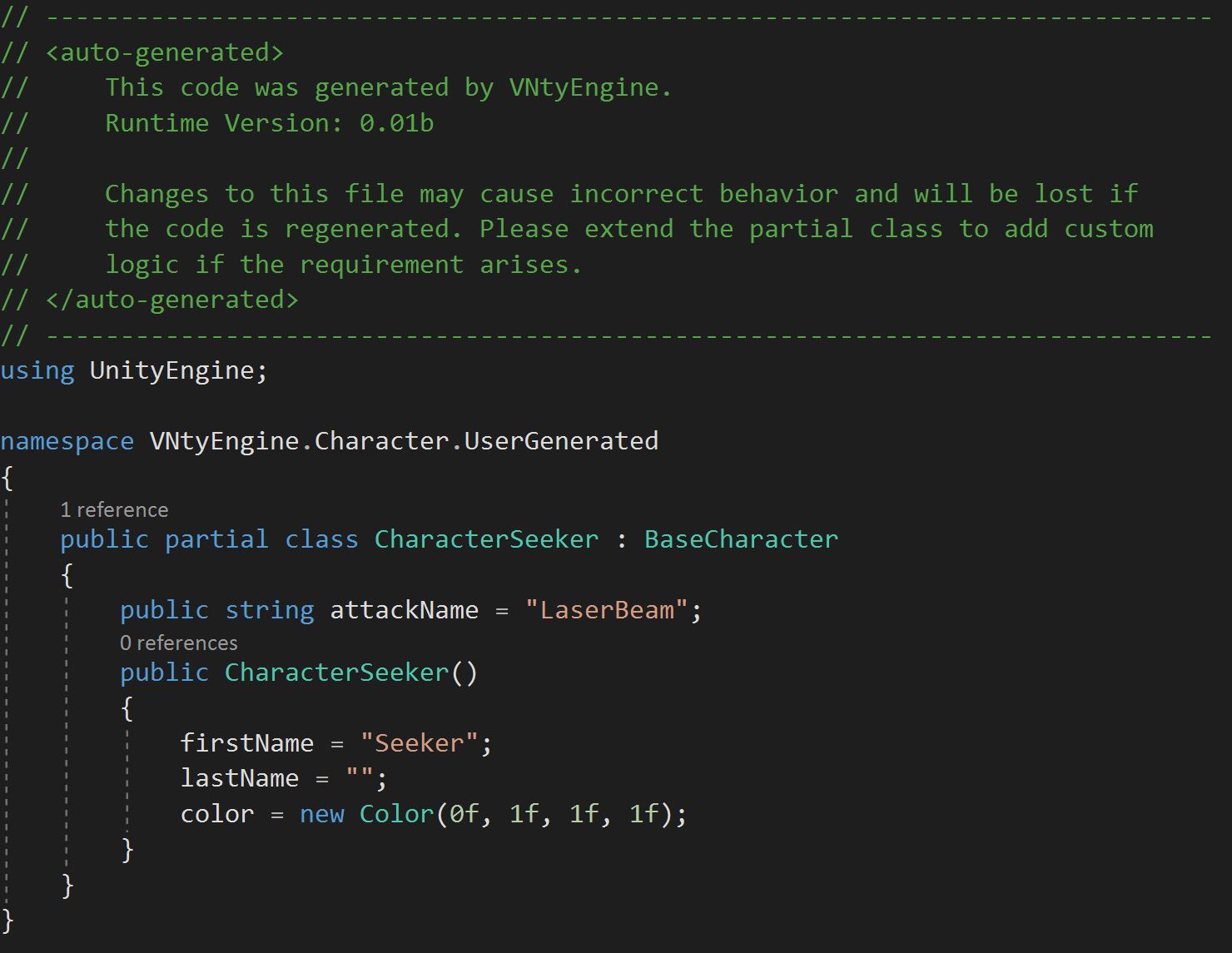
Behind the scenes, T4 Templates are used to auto generate classes and Reflection is used to retrieve details of Generated classes for further modifications.
Code Samples
Rendering field types for wizard
void RenderFieldValue(Rect rect)
{
    try
    {
		switch (FieldType)
		{
			case CharacterAcceptableFieldTypes.FLOAT:
				FieldValue = float.TryParse((FieldValue ?? default(float)).ToString(), out float floatResult) ? floatResult : default;
				FieldValue = EditorGUI.FloatField(rect, (float)FieldValue);
				break;
			case CharacterAcceptableFieldTypes.INT:
				FieldValue = int.TryParse((FieldValue ?? default(int)).ToString(), out int intResult) ? intResult : default;
				FieldValue = EditorGUI.IntField(rect, (int)FieldValue);
				break;
			case CharacterAcceptableFieldTypes.STRING:
				if (fromBaseClass && FieldName == "firstName")
					GUI.enabled = false;
				FieldValue = EditorGUI.TextField(rect, FieldValue?.ToString() ?? default);
				if (fromBaseClass && FieldName == "firstName")
					GUI.enabled = true;
				break;
			case CharacterAcceptableFieldTypes.COLOR:
				if (!(FieldValue is Color))
					FieldValue = null;
				FieldValue = EditorGUI.ColorField(rect, (Color)(FieldValue ?? default(Color)));
				break;
			default:
				throw new InvalidVariableTypeException("Please add case statement for type " + FieldType);
		}
	}
	catch (InvalidVariableTypeException e)
    {
		Debug.LogError(e.Message);
    }
}
Reflection to fetch Generated class details for updating
Type currentType = GetType("VNtyEngine.Character.UserGenerated." + this.ExactFilename);

List<FieldInfo> uniqueFields;
uniqueFields = currentType.GetFields(BindingFlags.Public | BindingFlags.Instance | BindingFlags.DeclaredOnly).ToList<FieldInfo>();
object instance = Activator.CreateInstance(currentType);
//loop through all the field info and find all the fields and their values.
for (int i = 0; i < uniqueFields.Count; ++i)
{
	CharacterClassFieldValue val = CharacterClassFieldValue.GetClassField(uniqueFields[i], currentType,
									uniqueFields[i].GetValue(instance));
	Fields.Add(val);
}
Development is still in progress. More features will be listed as soon as they are completed.